
BUILDING A COURSE USING THE BASELINE METHOD
The baseline method is a course-building method that uses a fixed “baseline” (usually a centerline) to measure off and locate obstacles on course. This method was developed for a small group to accurately place the agility obstacles in their relative position in the ring in correct spatial relationships as on the judge’s layout.
The major advantage to this method is its ACCURACY. The judge truly gets what is drawn on paper, which means that for it to work, it’s important that the judge has an accurate picture of the course area that is available before designing courses. It also means that the judge must draw the course as accurately as possible (correct angles of jumps, good position of tunnel entrances and exits, etc.), so that only minimum changes are required.
Another great advantage is that the course builders (volunteers) don’t need much knowledge of agility, or flow, as no consideration is made to adjust for course flow until all the obstacles are in place. The judge should then tweak the obstacles to ensure the course matches the challenges envisioned when designing the course.
COURSE MAP BASICS
To use this method, the course must be drawn on a grid, with a baseline, and a “coordinates” map generated. Both Course Designer and Smarter Agility have the capability of drawing out maps for using the baseline method.
Ideally, the baseline should be centered on the course, and it is indicated by a zero on the grid. Generally, it is good practice to put the baseline through the center of the course, either vertically or horizontally, to minimize the offset distance, in other words, along the longer distance of the course so that you have the least distances to be measured. This minimizes the margin of error. The baseline should start from one edge of the course, common practice is to use the side of the course where the entrance and exit are. This will be the start (zero) of your baseline. Also, starting the baseline at the ring perimeter gives the course builder a definitive point from which to recreate the baseline for future courses.
These videos show you how to set up your coordinates on Smarter Agility:

Both course design programs will give the obstacle reference points as coordinates. Obstacle coordinates are grouped in pairs; the first number is the horizontal distance, and the second is the vertical distance. This number notation follows the Cartesian coordinate system where the first number is the horizontal distance (X distance) and the second number is the vertical distance (Y distance). To the right of the baseline is positive and to the left is negative. By default, both programs show the “x” or horizontal coordinate first, then the vertical or “y” coordinate second (x,y). For ease of course building, we recommend having the coordinate along your baseline first, since it’s the first measurement you will need to look for, so you can measure from. If your course is drawn so that your centerline is on the vertical plane, you may want to change your defaults, to show your vertical “y” coordinate first (y,x). Both programs allow you to change these settings. (In Smarter Agility: go to “Settings” and under “Obstacle Coordinates Forma” you would edit and type the order you want – this order will remain until you change it again) (In Course Designer: Select View / Obstacle Coordinates. In the Obstacle Coordinates dialog box, select “Coordinate along baseline displayed first” and click OK.)
Once you have set your baseline, and coordinate preferences, you should be able to print a coordinates map as shown below:


Notice that the coordinates for Jump #13 are (8.5, -2). This means that you will look for 8.5 along your baseline, and then measure out 2m to the left. If you look at Jump #14, it’s coordinates are (10.8, 5.2), so you will look for 10.8 along your baseline/centerline, then measure 5.2m to the right of it.

It’s important to know where the coordinates are for each obstacle. For Jumps, the coordinate marks the center of the bar (this allows for different size bar than what is drawn). For Weave Poles, you are given the coordinates for the first and last pole (this allows you to set the correct orientation). For contacts (Seesaw, A-Frame, Dog Walk) you are given the center of the ramps at each end of the obstacle. For Tunnels, the coordinate marks the center of the entry and exit end.
BUILDING THE COURSE
You will likely need to locate the position of your baseline/centerline. To do this, lay out the tape from the top corner to bottom corner of the ring along the edge, and mark your midpoint. You will need to do this at the opposite end of the ring as well. I recommend using a stake or something fairly solid to mark it, so you can connect your tape to it every time you are ready to build a course. I will often lay a sandbag on top to protect my marker between classes.
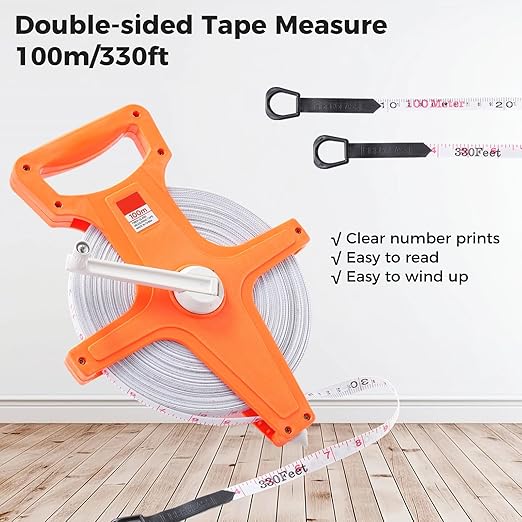
Lay your tape measure along the baseline (usually the middle of the course), starting from your zero towards the far end. This is where you will locate your first coordinate for each obstacle to measure out from. In the above image, for Jump 13, this would be where you would look for 8.5m. Get familiar with your tape, they are all a bit different but once you’ve played with it some it will become easy.
Next you will measure your offset distance from this point (in the Jump 13 example, you would measure 2m). The chief course builder should have a measuring wheel with which to measure the offset distance to the obstacles from the baseline.


You can either mark your points first, as you measure them out, or physically lay out your obstacles. If you are building your course indoors on turf, it’s useful to use painters’ tape or stickers to mark your coordinate points. If you are working outdoors on dirt or grass, you can use flags or golf tees as shown in the picture below. If using these, it’s VERY important that you remove all the golf tees as you lay out your obstacles, to avoid any safety hazard for the dogs. I often use my number markers or cones as markers for my obstacles, as well. In the case of contacts, Weave Poles and Tunnels, it’s good practice to make sure you have marked both ends before asking volunteers to bring out the equipment. Also, consider what obstacles you may need to measure out first before bringing these “bigger” obstacles to the field.

For each obstacle:
- Find the baseline distance on the tape
- Measure out the offset distance perpendicular to the baseline (negative numbers to the left, others to the right)
- Set a marker for that point
- Ring crew, not the chief course builder, moves the equipment into place
For jumps, rotate the course layout to the orientation of the ring and set the bar on the ground at the same angle shown on the map.
TIPS & TRICKS
• Orient the baseline along the long axis of the ring so that the perpendicular offset distance is minimized. This diminishes the effect of any errors.
• Brief your crew ahead of time on who will be doing what, and explain how you will mark the different obstacles. Find what works for you, but communicating will help avoid problems.
• Mark out the long obstacles and contacts first since this helps to give the ring crew a better reference when setting angled jumps. Some people use jump bars in the shape of a T to mark out contacts and Tunnels, others use cones.
• When setting jumps, have one ring helper carry some bars and hand them off to the chief course builder as they measure out the correct distance. As the bar is set down on the ground in the correct orientation, another ring crew can bring in the wings and extra bars to set the jump. When bringing wings out to the field, have workers keep them together, this way, if you see a set of wings already on either end of a bar, you know this jump has already been set.
• Use a clearly visible marker—a cone works well for contacts, weave poles, and so on. Your number markers can be a great help but be careful not to run your contacts over them.
• Set ring barrier markers at intervals to match your grid and put a distance marker there to give the course builder a good reference for direction out from the baseline. You can also use two other tapes (if available) to mark the distances alongside the ring edges.
• Be efficient in ring crew. Know who is moving the big pieces of equipment into place. Have extra help for jump setting while others build the big pieces.
• The chief course builder has the master course copies; also give the ring crew copies of the courses, or have them take a photo with their phones for reference.
• If building nested courses, mark which obstacles remain in place from course to course (both Course Designer and Smarter Agility have this feature).
Setting up your Baseline Grid in Smarter Agility:
Drawing Coordinate Maps in Smarter Agility:
Video taken during the FCI Baseline Method Presentation:
 Sheyladogs.com
You must be logged in to post a comment.